Skip to content
bankpage

Nutra bank pages.

Generate Nutra bank pages across multiple companies in one Flow. AI creates each brand, favicon, copy, imagery and design, including branded photography for eligible private-label packaging. Product details, policies and merchant checks stay connected to the site being prepared for review.

Websites created with Bankpage

Wellness products with a complete brand.

Choose a complete Nutra product range.

Nutra uses its own product categories and selection workflow. Choose the category and price points for the business, then inspect the matched assortment before generation. Bankpage connects those products to a branded, single-category storefront with dedicated product pages, customer policies and checkout.

  • Nutra category
  • Matched prices
  • Product facts
  • Branded imagery

A price-led assortment

New Nutra Flow plans accept 10 to 20 distinct prices. Matching happens before generation, making it possible to review the selected products and price coverage as part of the batch.

Product facts stay attached

Present the descriptions, ingredients, directions and specifications supplied with each catalog record. Review the factual content in the editor before publishing the product page.

A focused shopping experience

One Nutra category feeds one Catalog destination. The site stays centered on the selected wellness range, with product discovery, detail pages and a shared checkout instead of a department-style menu.

The product and the packaging stay connected.

A Nutra brand needs more than a wellness-themed homepage. The selected product, its supplied information and the authorized identity on its packaging need to describe the same item. Bankpage keeps those pieces connected through the product-image workflow.

Brand the eligible packaging
For eligible private-label products, the saved store logo informs the generated packshot. The identity belongs on the packaging itself, with the original product and source material guiding the image.
Review the details that matter
Check the product form, visible label text and logo placement together. Keep a suitable result or regenerate the selected image. Third-party branded products retain their authorized original branding.

Your logo belongs on the right packaging.

Brand identity

Connect the brand

The store’s saved logo and visual identity feed the photography workflow. For eligible private-label products, that logo becomes part of the product packaging rather than a separate badge placed over the image.

Product photography

Generate the packshot

Generate a product photograph using the selected source material and authorized branding. The workflow distinguishes private-label packaging from third-party products whose original branding must remain intact.

Asset review

Inspect the result

Review the product, logo placement and visible packaging text. Track the status of each generated image and reject or regenerate an individual asset when it does not match the intended product and brand.

Store product images

Keep assets current

The image status belongs to the current product and store identity. A product or logo change can be addressed through the asset workflow, without requiring a new website or a complete batch restart.

AI builds more than the packaging.

AI handles the creative work.

Each Nutra website receives its own logo, favicon, written content, editorial imagery and design configuration. Its color palette, typography, section sequence and component combination stay independent from the other wellness brands in your account.

Packshots and editorial scenes

Product photography shows the selected item and its authorized packaging. Editorial images support the page’s visual direction. Manage those assets separately, review their status and regenerate the exact image that needs work.

Logo & favicon

Generate a matching identity for the website header, browser tab and brand assets.

Website copy

Create the site’s written content from the business brief, then edit the sections that need a more specific voice.

Design & layout

Save colors, typography, section order and component choices per website, with responsive previews as you refine them.

One wellness category. A brand of its own.

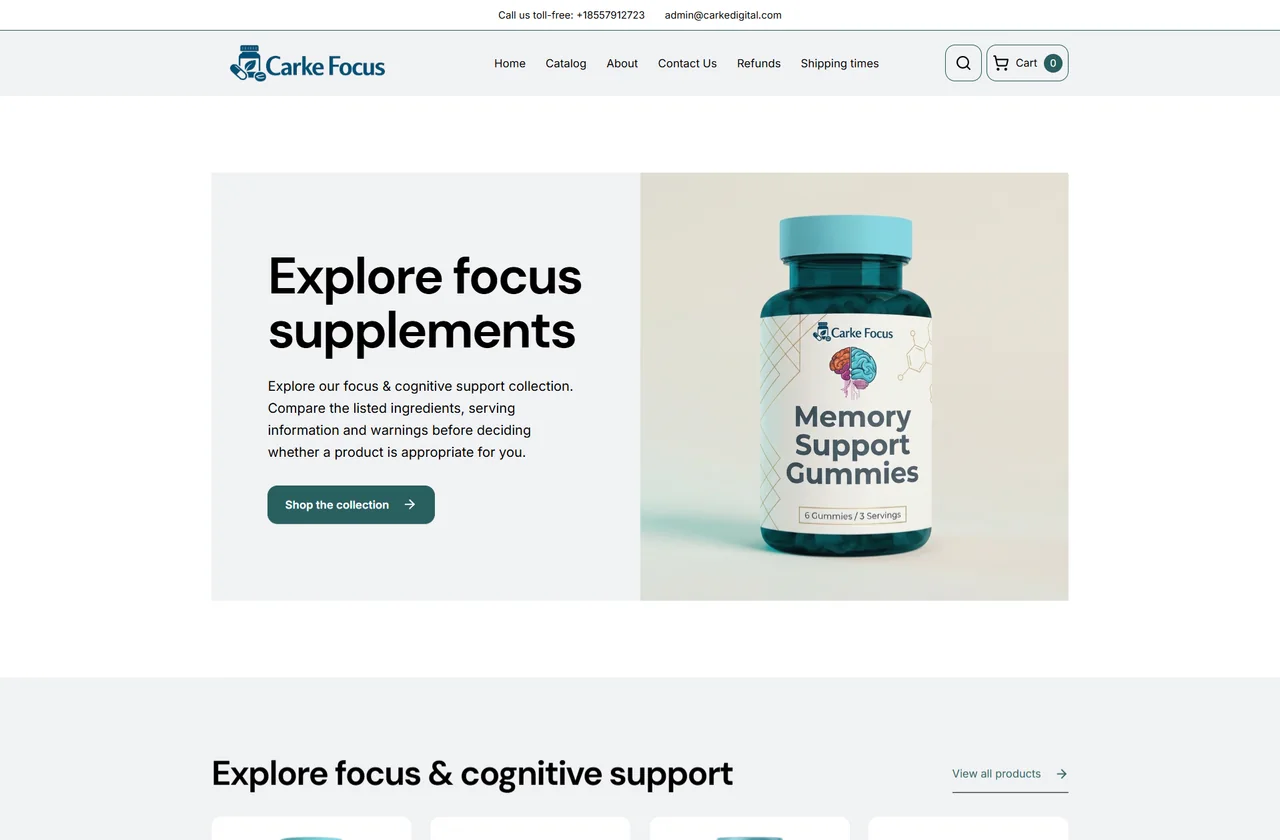
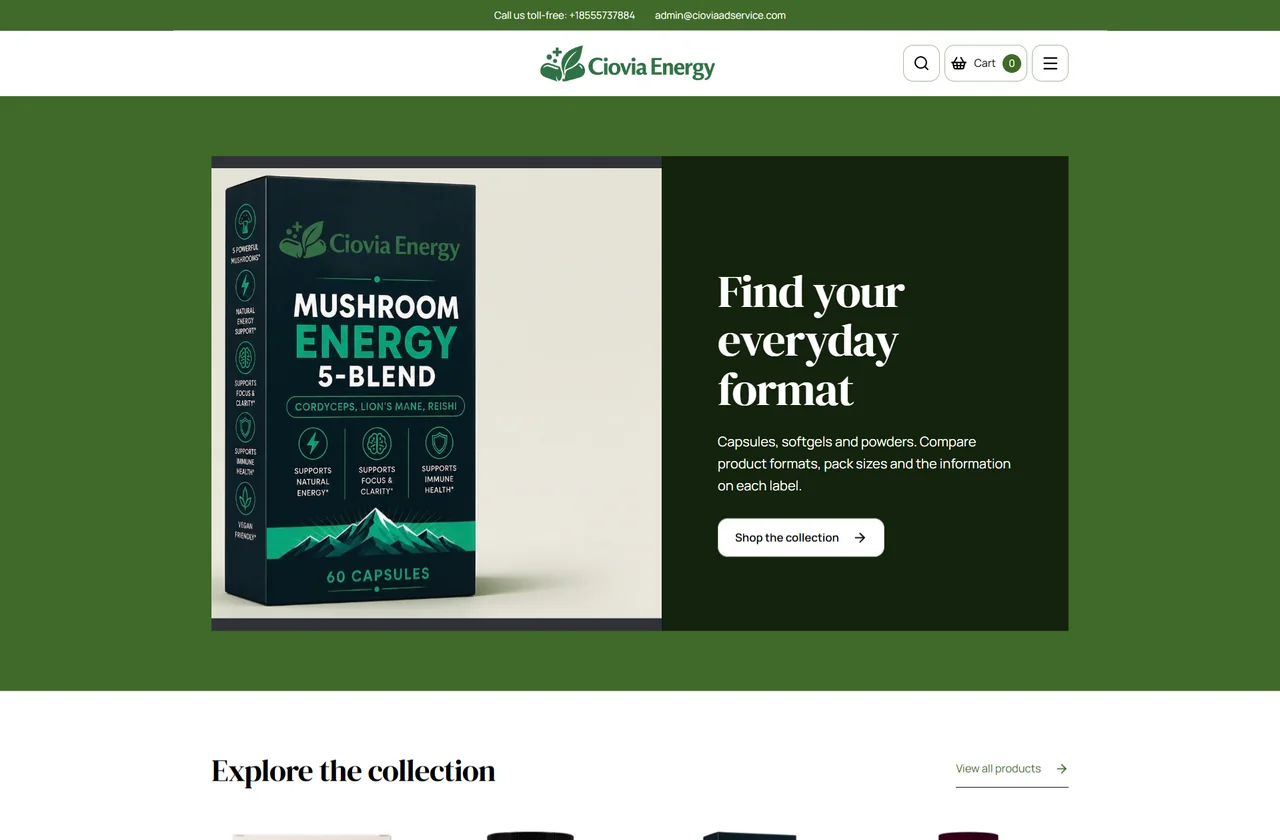
The product range provides a focus, while the brand system gives the site its character. Logo, favicon, editorial images, copy, colors and layout are generated for the individual website. These Nutra examples show different ways to present a focused range while keeping products central to the page.

Carke Focus: generated website with its own logo, visual identity and page composition
Carke Focus
Ciovia Energy: a different brand and layout within the same website type
Ciovia Energy
Logo & faviconWebsite copyColor, type & layout

Generate Nutra brands across your companies.

The company record carries through.

Keep site identity, generation progress, previews and final domain status connected to the company and the batch that created them.

  1. Choose the businesses and ranges

    Add the companies, number of Nutra sites, categories and price points to a Flow. Review company contacts, fulfillment details and the products proposed for each brand.

  2. Prepare identity and content

    The plan ties each site to its own category and company. AI creates the brand assets and website copy while the product details remain associated with the selected catalog records.

  3. Run product photography

    Enable the product-image workflow for the batch, then follow generation and review status. Resolve missing or rejected assets for the affected products before completing publication checks.

  4. Review the complete site

    Use the hosted preview to inspect the storefront, packshots, product information and customer policies together. Track the domain and publication state alongside the generation run.

Give product facts a clear place on the page.

Refine the generated storefront around the information supplied for the actual products. Structured editing lets you improve the presentation without losing the connection between the catalog, product page and website identity.

Keep supplied information readable
Review descriptions, ingredients, directions and specifications where available. Correct the relevant record or content section when a detail needs attention, using the product documentation as the source.
Treat each image individually
Review packshots and editorial assets separately. Replace or regenerate a selected asset, then inspect its framing and the surrounding content in the responsive preview.
Publish the reviewed version
Save content changes as a draft and review the product pages alongside the brand story and policies. Publish the intended revision once the facts and presentation are ready.

Keep product, merchant and policy details together.

Merchant information, connectedCompany · Products · Policies · Checkout

Readable product information

Keep product descriptions, supplied ingredients, directions and specifications available on the detail page. The editor lets you correct the source content used by a particular website.

A visible merchant

Reuse the linked company’s legal identity and business contact details. Customers can reach the contact page and find the business responsible for the products they are viewing.

A complete customer journey

Connect the catalog, product pages, cart and checkout with shipping, return, refund and legal information. Configure payment settings and the billing descriptor from the same website record.

Review before sharing

Inspect merchant readiness, imagery and publication status in one place. Product claims and certifications remain matters to verify with the relevant product documentation; the website checklist does not certify a supplement.

Hosted, connected and manageable at scale.

Preview first. Publish on your domain.

Every generated website has a hosted preview. Connect an existing domain or use the configured registrar workflow to check availability and purchase one within the budget you set. DNS verification, HTTPS and the website’s publication state stay visible in the portfolio.

Keep the whole portfolio in one workspace.

Manage websites, company records, content, catalogs, assets and domain settings together. Reopen any site to update its configuration or regenerate an asset instead of starting from a blank project.

Prepare a FlowLaunch generationRead progressRetrieve URLs

Run the same workflow through the API.

Use API keys and the downloadable guide to connect your automation or AI agent. Prepare and launch batches, poll their status, inspect individual results and retrieve the final website addresses through documented HTTP endpoints.

Questions about Nutra

Is Nutra a separate website type?

Yes. Nutra has its own catalog scope and visual families while sharing Bankpage’s product, cart, checkout, domain and website management tools.

Can I review the generated images?

Yes. The product asset studio shows generation and review status, with controls to reject, regenerate and retry selected assets. Eligible private-label images use your store logo; existing third-party brands are preserved when private labeling is not authorized.

Does the checklist certify my products?

The checklist helps review website content and configuration. Product claims, regulatory requirements and product certifications need the appropriate independent verification.

Launch your next batch with Bankpage.

Start my 3-day free trial$499/monthUnlimited platform access